What is a UISearchController?
It is a component that helps us display search results to a user in a proper and clean way.
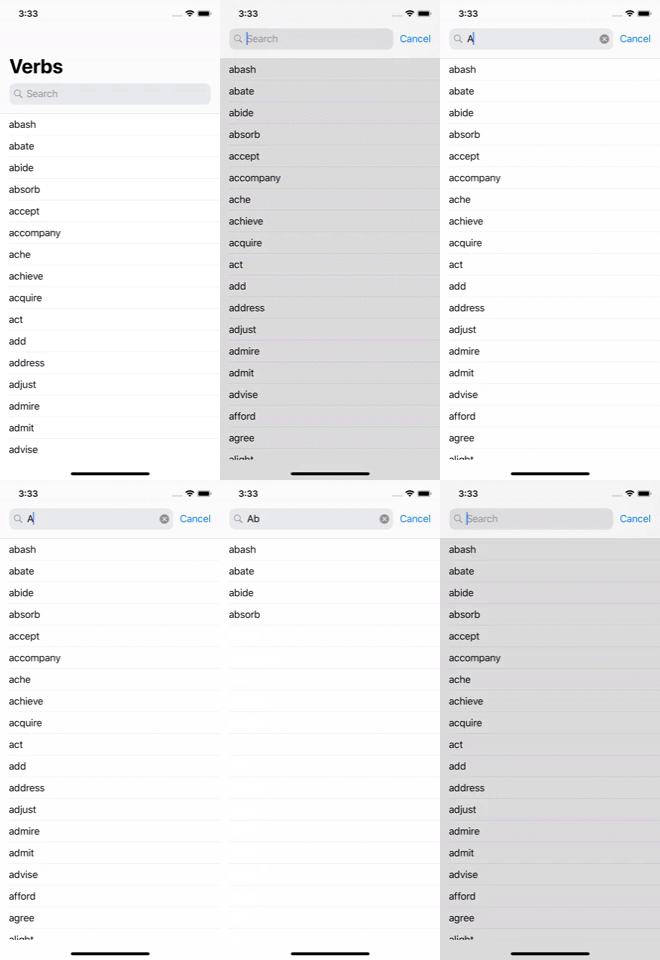
Implementing a UISearchController
First, we are going to declare a ViewController where we will display the search results, which we will call ResultViewController. For my example, I created a ViewController in the storyboard and added an identifier to be able to use it:
// We use lazy to load it in memory when we need it
lazy var resultViewController: UIViewController = {

    // We call the Storyboard where my ViewController resides
    let storyboard = UIStoryboard(name: "Main", bundle: nil)

    // Instantiate the ViewController using the identifier we assigned to it
    let resultView = storyboard.instantiateViewController(withIdentifier: "ResultsViewController")

    /* Validate if the instance is of the ResultsViewController class, which
    we will use to display the results */
    guard let resultViewController = resultView as? ResultsViewController else {
        fatalError("Problems with viewController")
    }
    return resultViewController
}()
Then I’m going to create an instance of the UISearchController and perform the customization we want:
lazy var searchController: UISearchController = {

    /* We create the instance and assign it the ViewController where we are going to display
     the results (the ResultViewController we created earlier) */
    let searchController = UISearchController(searchResultsController: resultViewController)

    // We are going to show a dark overlay view with alpha when using the search bar
    searchController.dimsBackgroundDuringPresentation = true

    // Hide the NavigationBar when the search bar is displayed
    searchController.hidesNavigationBarDuringPresentation = true

    // We apply the delegate of the view we will use for results
    searchController.searchResultsUpdater = self
    return searchController
}()
Since we already have our SearchViewController, we assign it to the view where we want to display it. Remember that since iOS 11, Apple gives us the ease of placing it in the NavigationBar:
override func viewDidLoad() {
    super.viewDidLoad()

    /* We assign the SearchController to the ViewController that must already have a
    NavigationBar implemented */
    self.navigationItem.searchController = searchController

    /* With this line, we say that we do not want to hide the SearchBar
    when scrolling */
    self.navigationItem.hidesSearchBarWhenScrolling = false

    /* We define that the ResultViewController is displayed under our
    NavigationBar. If we set definesPresentationContext to false, the
    ResultViewController will show on the entire screen. */
    self.definesPresentationContext = true
}
Showing the search results
To display the search results of the SearchController, we must implement the delegate we previously set:
searchController.searchResultsUpdater = selfextension MainViewController: UISearchResultsUpdating {
/* This is the delegate method to get each character entered
in the SearchBar */
func updateSearchResults(for searchController: UISearchController) {
// Get the text from the SearchBar
guard let searchText = searchController.searchBar.text else {
return
}
/* We pass the text to our *getResults method and get
the filtered data */
let filteredResults = getResults(searchText)
/* We use the searchController provided by the delegate method from which
we get the view where we display the results by using
searchResultsController, which we validate to be of the
ViewController type we will use to show the results. */
if let resultView = searchController.searchResultsController as? ResultsViewController {
/* resultView.results is how we are going to pass to our result view
the results we filtered previously */
resultView.results = filteredResults
}
}
}- The getResults method we used to get the filtered data should be your custom method to make the comparison between the text entered in the searchBar and your data source.
Conclusion
We should take advantage of the ResultViewController since it is one of the most convenient ways to display search results. I have seen on other occasions where developers usually use the SearchController by assigning the ResultViewController as nil and ending up using the SearchBar protocols to get the data entered in the SearchBar’s textField, which would be unnecessary if you know how to use the ResultViewController.
- The final demo can be found on Github