How to implement Live Activities?
Live Activities allow us to show the user real-time running activities. These activities can be displayed both on the Dynamic Island and on the Lock Screen.
For this implementation, we will need:
- WidgetKit
- ActivityKit
- SwiftUI
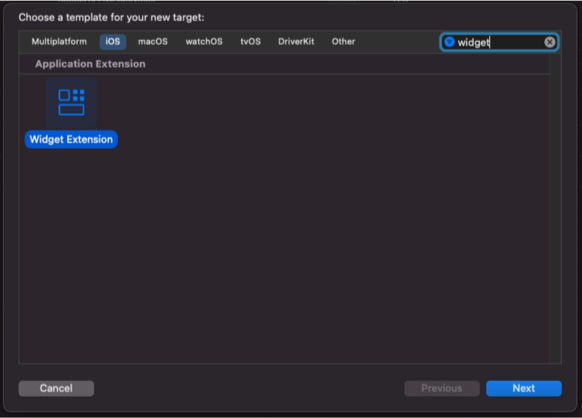
First, we create a widget for the project
We are going to create a new target in which our LiveActivity and any other widgets we are going to implement will reside.
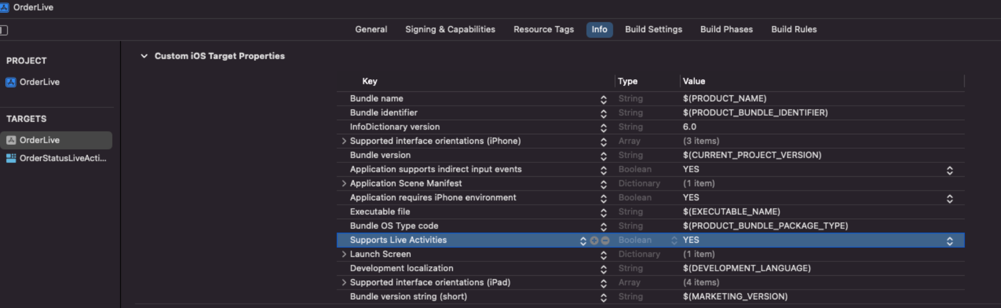
Enable Live Activities in our info.plist
We add NSSupportsLiveActivities with a value of YES in the info.plist of the main application target.
Define the ActivityAttributes
The ActivityAttributes is a protocol that reflects the data we will use in the widget displayed on the lock screen. We implement this protocol with the data we will be working with:
import ActivityKit

struct LiveOrderWidgetAttributes: ActivityAttributes {
    public struct ContentState: Codable, Hashable {
        // This is dynamic data, which will be updated via api or via push notification
        var step: String
    }

    // This is static data
    var restaurant: String
}
Implement our UI for both the Lock Screen and the Dynamic Island
import WidgetKit
import SwiftUI

struct LiveOrderWidgetLiveActivity: Widget {
    var body: some WidgetConfiguration {
        ActivityConfiguration(for: LiveOrderWidgetAttributes.self) { context in

            // This view will be the one displayed on the LockScreen
            OrderView(orderStep: OrderStep(rawValue: context.state.step) ?? .started)
                .activityBackgroundTint(Color.cyan)
                .activitySystemActionForegroundColor(Color.black)

        } dynamicIsland: { context in

            // This view will be the one displayed on the Dynamic Island
            DynamicIsland {
                DynamicIslandExpandedRegion(.center) {
                    OrderView(orderStep: OrderStep(rawValue: context.state.step) ?? .started)
                }
            } compactLeading: {
                Image(systemName: "bicycle")
            } compactTrailing: {
                Text("InProgress")
            } minimal: {
                Image(systemName: "bicycle")
            }
            .widgetURL(URL(string: "http://www.apple.com"))
            .keylineTint(Color.red)
        }
    }
}
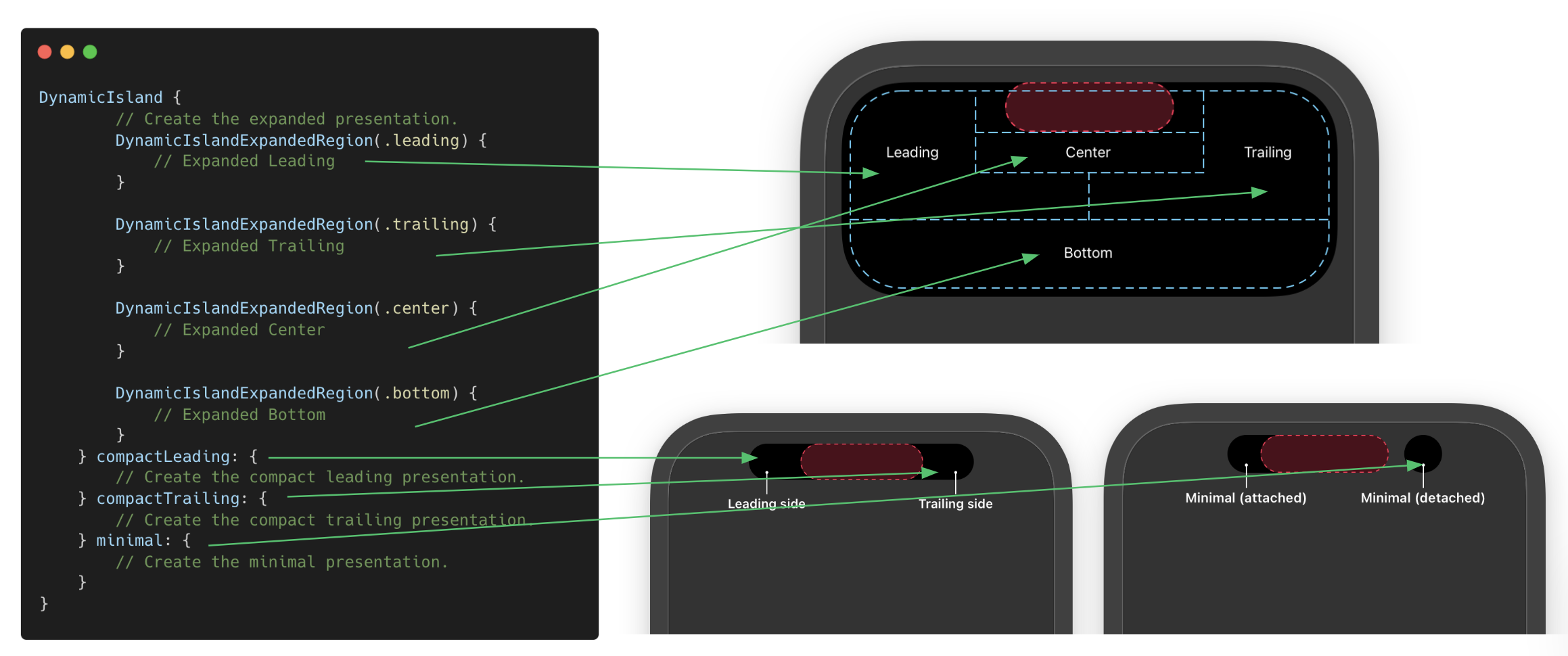
Now we show the detail of what each function of the DynamicIsland struct represents:
Updating our LiveActivities
We can update our LiveActivity using the ActivityKit API with the following methods:
To start the LiveActivity, we use request
var orderActivity: Activity<LiveOrderWidgetAttributes>?

do {
    let attributes = LiveOrderWidgetAttributes(restaurant: "Weriklandia")
    let initialState = LiveOrderWidgetAttributes.ContentState(step: "start")
    orderActivity = try Activity.request(attributes: attributes,
                                        contentState: initialState)
} catch {}
To update the LiveActivity, we use update
let newState = LiveOrderWidgetAttributes.ContentState(step: "inProgress")
Task {
    // This alert configuration shows a push notification on the Apple Watch
    let alertConfiguration = AlertConfiguration(title: "Delivery Update",
                                                body: "Your pizza is arriving",
                                                sound: .default)
    await orderActivity?.update(using: newState, alertConfiguration: alertConfiguration)
}
To end the LiveActivity, we use end
let endState = LiveOrderWidgetAttributes.ContentState(step: "end")
Task {
    await orderActivity?.end(using: endState, dismissalPolicy: .default)
}
Updating our LiveActivity using push notifications
In this case, we would need to perform the request in a slightly different way. We need to request a push token, which we will send to our backend so it can send the push notifications.
👀: Remember that you must request permissions to receive push notifications using UserNotificationCenter, but the tokens registration is handled by ActivityKit.
var orderActivity: Activity<LiveOrderWidgetAttributes>?

let attributes = LiveOrderWidgetAttributes(restaurant: "Weriklandia")
let initialState = LiveOrderWidgetAttributes.ContentState(step: "start")

do {
    // We add the pushType
    orderActivity = try Activity.request(attributes: attributes,
                                            contentState: initialState,
                                            pushType: .token)
    if let orderActivity = orderActivity {
        print("orderActivity \(orderActivity.id)")
        Task {
            let tokenUpdates = orderActivity.pushTokenUpdates.makeAsyncIterator()
            await tokenUpdates.next().map { data in
                // This is the token we will use to send update push notifications
                print("tokenUpdates data \(DeviceToken(data: data).hexString)")
            }
        }
    }

} catch(let error) {
    print("Error in request: \(error.localizedDescription)")
}
The push payload format also changes slightly, and we need to add the content-state attribute, which must match the ContentState struct we defined in ActivityAttributes.
Therefore, the payload should look like this:
{"aps": {
        "timestamp":1668562569,
        "event": "update",
        "content-state": {
            "step": "inProgress"
        },
        "alert": {
            "title": "Race Update",
            "body": "Tony Stark is now leading the race!"
        }
    }
}
And if we remember, our ContentState in ActivityAttributes was:
 public struct ContentState: Codable, Hashable {
    var step: String
}
There we see that it matches what we are sending in our payload.
👀: Another detail to consider is that when we test sending push notifications, we must update the timestamp with the current time the push is sent, otherwise our LiveActivity will not update.
Here is a script to test sending push notifications.
And with that, we cover a basic implementation of LiveActivity.
If you like, you can check the repo containing the complete example.
Thanks for reading! 😄